Automate Tasks In Google Sheets

Send email, set reminder, track project, move row, copy data and more, all without code.

Top Rated in Google Marketplace
GET STARTED FOR FREE WATCH DEMO
No sign up required
No coding skills required
SheetAutomation

Powerful Automation Features

Form Submission Handling

Handle form submision for Google Forms or any other third party forms. Automatically send confirmation or reminder based on response or sheet data.

Automated Scheduling

Set up recurring tasks like data imports, report generation, and notifications to run automatically. Support hourly, daily, weekly, or monthly.

Sheet Update Monitoring

Monitor data update in cells, columns, ranges or new rows added to sheets. Trigger instant workflow upon the changes.

Flexible Conditions

Create conditions based upon sheet content or variables to filter data processing.

Data Processing

Automatically clean, format, and correct data entries. Move, copy rows between sheets.

Smart Alerts & Notifications

Send email, SMS or slack notifications for critical changes, thresholds, or deadlines.

Seamless Integrations

Connect effortlessly with popular apps via webhook or HTTP, complement your existing workflow.

Team Collaboration

Share automation to your team. Manage automation rules collaboratively.

Customization

Implement flexible logic with programmatic actions. Customize actions using script for power users.

How It Works

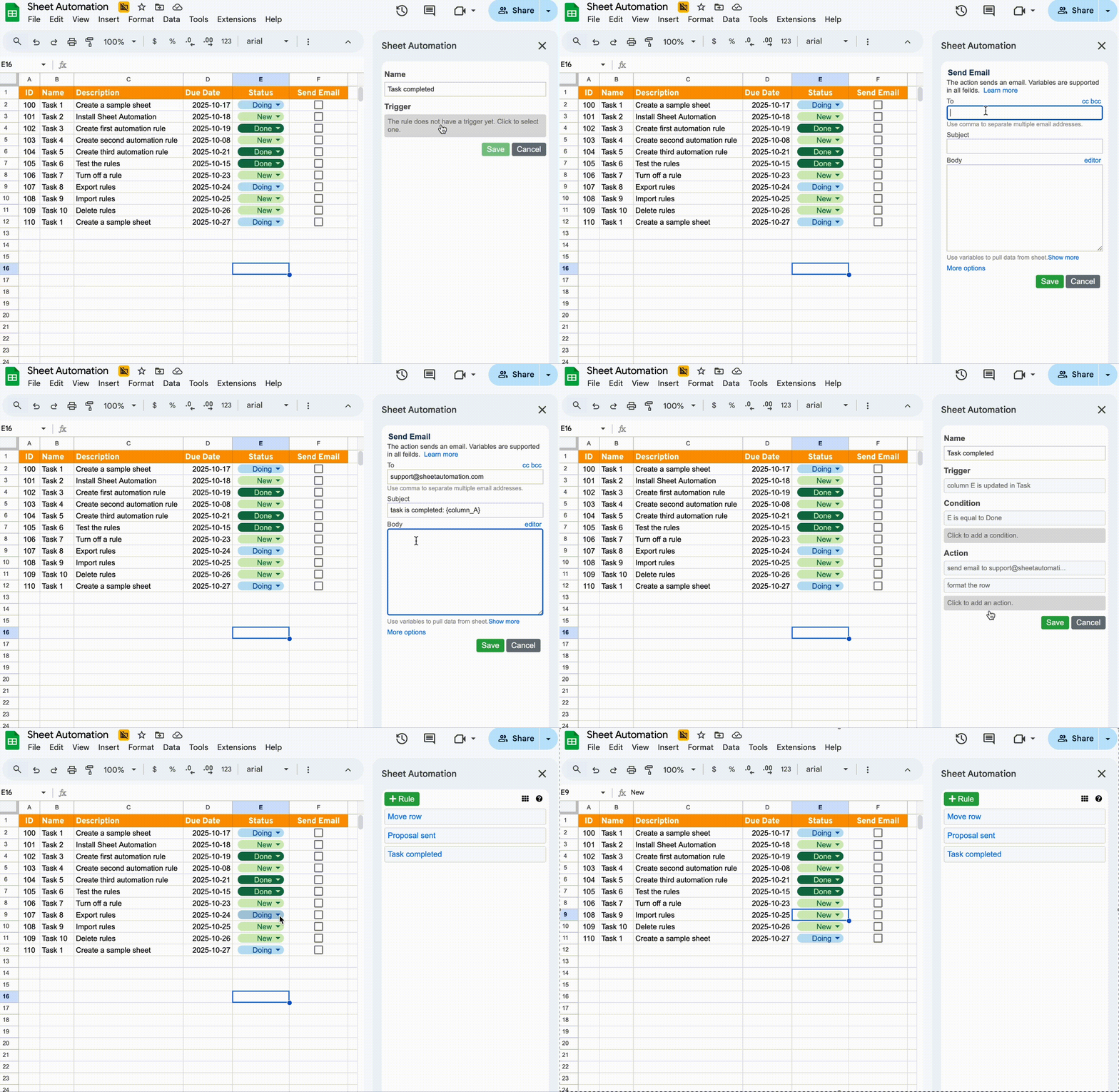
Automate your workflow in three simple steps.

SheetAutomation interface
1
Create Triggers

Set up triggers to monitor your sheet for events like new form submissions, cell updates, or specific time schedules.

2
Define Conditions

Use flexible filters to define exactly when your automation should run based on the data in your rows or specific cell values.

3
Select Actions

Choose from a wide range of actions like sending emails, moving data, or triggering webhooks to perform your business logic.

SheetAutomation vs. The Alternatives

Understand how SheetAutomation provides a more efficient experience compared to alternatives.

SheetAutomation vs Zapier

Learn why native Google Sheets automation is 10x faster and significantly cheaper than external integrations.

Read Comparison

SheetAutomation vs Apps Script

Stop debugging complex scripts. Automate everything with a visual builder that requires zero coding knowledge.

Read Comparison

Join 300,000+ Happy Users

Forget complicated spreadsheets! This tool has transformed our Google Sheets workflow. It's fast, efficient, and so easy to use. We've saved countless hours without needing any fancy software.

Google Sheets Automation deserves five stars! It's made our work much more efficient and error-free. The user-friendly interface has simplified complex processes, and it's been a game-changer for our productivity.

I have been able to use this tool for years with essentially no issues. I can't say that about most things I've used. It's simple, straightforward, I get exactly what I want done when I want it done.

We have been using Sheet Automation for almost a year. It has given us the ability to grow and communicate as a team. The sample rules and help online is amazing. We are continuing to learn new ways to streamline operations.

Surpasses all of the others! It is the holy grail of email communications, allowing for scenarios not available in competitors. It also can do a whole lot more and I look forward to exploring additional workflow processes.

Fantastic addition to google sheets, has been incredibly helpful for setting up a task management system where I can give users access to their own list and link all the lists together.

Find more genuine reviews from Google Workspace Marketplace .

Ready to Automate Your Google Sheets?

Install From Workspace Marketplace

Newsletter

Stay updated with Sheet Automation product news and tips.

  •